
White label rank tracker for agencies Every client's rankings, checked every day. The report is one message away.
TheSerpAgent is the white label rank tracker your AI runs. Every client site sits in one account, and every position is kept with its date. When a report is due, ask Claude Code or Cursor and you get a PDF with your name on it. Report day stops being a day.
14 days free with a card on file. Cancel any time. White-label reports on every plan.
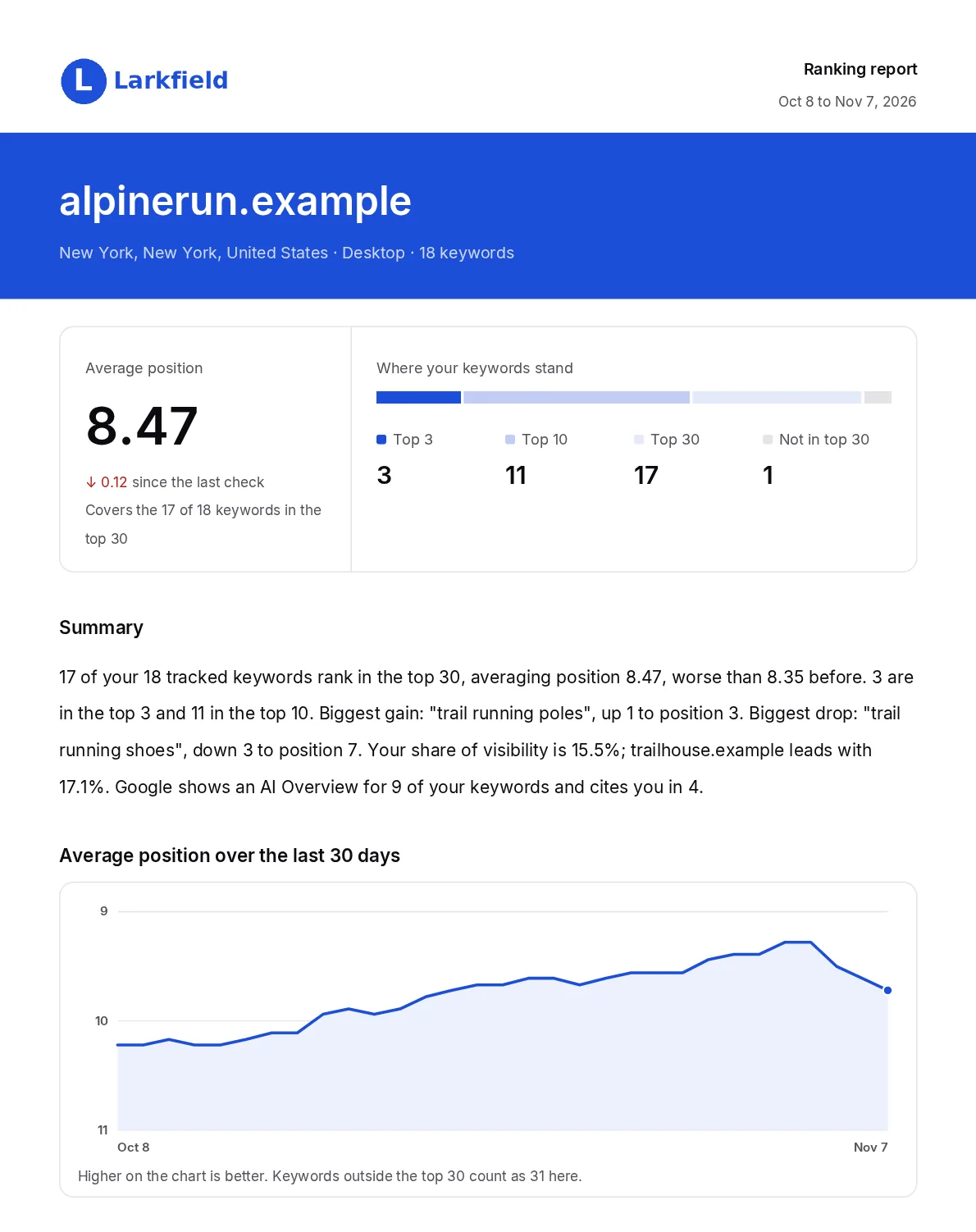
generate_report. The agency, its client and the positions are sample data.One account holds every client's site
Each project is one website in one location, one language and one device. To track a client in two cities, or on desktop and on mobile, add a second project.

| Starter | Premium | Pro | |
|---|---|---|---|
| Price a month | $19.99 | $29.99 | $59.99 |
| Client sites | 10 | 25 | 50 |
| Keywords checked daily | 200 | 500 | 1,000 |
| Refresh checks a month | 1,000 | 2,500 | 5,000 |
| Rival sites per client | 3 | 5 | 5 |
Keywords are shared across the account, so you split them between clients as you like. A second city or device is a second project, and its keywords count again. Every plan's detail
A client asks about a drop. Your AI has the record.
TheSerpAgent checks Google every day and keeps the position, the ranking page and the date. Your AI reads that record, and the same record is in the dashboard. Nothing to export or paste. See the old way and the new way
- What moved: winners and losers over 1, 7 or 30 days.
- What changed around the keyword: which sites entered or left the top results between two dates.
- The limit: it shows a difference, never a cause. You read it and decide what to tell the client.
alpinerun.example: which keywords dropped this week? For the biggest drop, show me what changed around it. Then make the client report for the last 30 days.
- list_projects
- get_changes
- get_overview
- get_report_branding
- generate_report
- explain_change
- get_keyword_history
- get_rankings
Four alpinerun.example keywords dropped this week, and "trail running shoes" is the one to look at first. Three fell by 3 places, so I picked it because it has by far the most searches.
| Keyword | 7 days ago | Now |
|---|---|---|
| trail running shoes | 4 | 7 |
| waterproof trail shoes | 9 | 12 |
| waterproof running socks | 9 | 12 |
| ultramarathon training plan | 28 | Out of the top 30 |
| Position | Nov 6 | Nov 7 |
|---|---|---|
| 3 | footpodreviews | runnersdepot |
| 4 | alpinerun | gearlab-reviews |
| 5 | fleetfootmag | summitgear |
| 7 | pacechart | alpinerun |
New and gone: gearlab-reviews entered the top 10, and fleetfootmag fell out of it. […] Cause: this data shows what moved, not why, so it doesn't explain the drop.
Download the 30-day PDF report. Link expiry: it stops working after an hour, so send the PDF itself rather than the link. […]
Reports carry your name
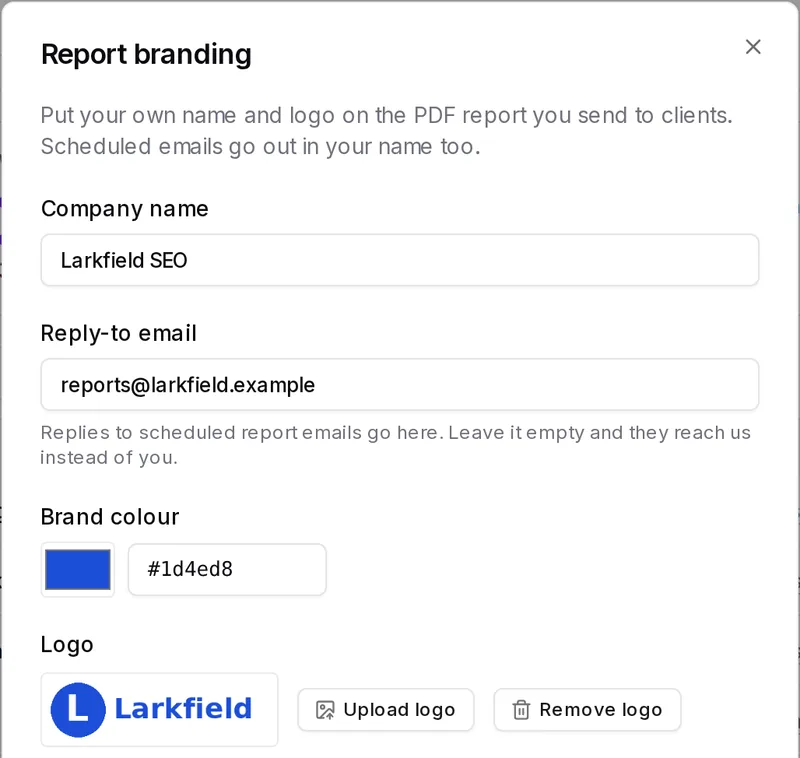
Give each client project a company name, a brand colour and a logo. The SEO report for that client carries them, and the line that credits TheSerpAgent can be switched off. Nobody has to know how little time it took.
What the PDF holds
- Average position, and how many keywords sit in the top 3, top 10 and top 30
- A short summary, written automatically, with moves counted since the last check. Text your AI writes stays in your chat
- The average position trend over the period, with keywords outside the top 30 counted as 31
- Winners and losers over the report's 7 or 30 days. A keyword that left the top 30 counts as a loser, shown as "was 12". One that entered is not listed as a winner
- Every keyword with its position, change, best position and ranking page
How it reaches the client
- Ask your AI: it covers the last 7 or 30 days and comes back as a download link that works for one hour.
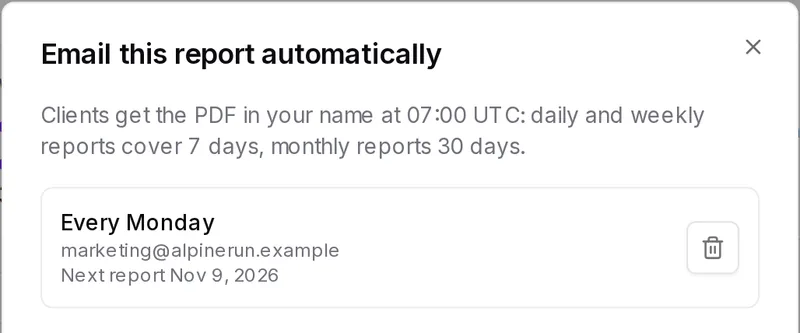
- Or schedule it, in the dashboard or through your AI: daily, every Monday or monthly, to up to 5 addresses, at 07:00 UTC. It shows your company name, and replies go to the address you set.
What your AI reaches, and what stays in the dashboard
Your AI runs the tracking and the reporting through one connection. Billing, login and API keys stay with you in the dashboard.
| Job | Your AI | Dashboard |
|---|---|---|
| Add, edit or delete a client site | Yes | Yes |
| Add, rename, star and remove keywords | Yes | Yes |
| Read positions and each keyword's history | Yes | Yes |
| See what moved over 1, 7 or 30 days | Yes | Yes |
| Compare two dates: which sites entered or left the top results | Yes | No |
| Refresh chosen keywords now | Yes | Yes |
| Competitor positions and share of visibility | Yes | Yes |
| Google AI Overview: shown and cited | Yes | Yes |
| Daily alerts by email, Slack and webhook | Yes | Yes |
| See, change or delete an alert | Yes | Yes |
| Make the branded PDF report | Yes | Yes |
| Set the report's name, colour, logo and reply address | Yes | Yes |
| Email the report on a schedule | Yes | Yes |
| A summary written automatically | Yes | Yes |
| Your AI writes its own summary, in your chat | Yes | No |
| Import or export a CSV | No | Yes |
| Billing and changing your plan | No | Yes |
| Changing your login | No | Yes |
| Create or revoke an API key | No | Yes |
What it does not do
TheSerpAgent tracks Google positions and reports on them. An agency should know these limits before it signs up.
- Client logins
- No sub-accounts or client view. Clients see the PDF.
- Team logins
- One sign-in per account today.
- Depth past the top 30
- A keyword further down reads as not in the top 30.
- Local Map Pack and Bing
- Google organic results only.
- Backlinks and keyword research
- Neither is part of the product.
- More than 1,000 keywords
- No plan goes higher today.
What agencies ask
What does white label mean here?
Scheduled and downloaded reports use your colour, name and logo, and the line that credits TheSerpAgent can be switched off, in the email too. You set this per project, in the dashboard or through your AI, on every plan. Scheduled emails show your company name and come from our sending address, and replies go to the address you set. With our name hidden and no company name, the sender reads Ranking report. The link from your AI is on our domain and lasts one hour.
Can a client log in and see their own rankings?
No. There are no client logins or sub-accounts today. Clients see their numbers in the PDF you send, by hand or on a schedule.
Can my AI run up the bill?
No. Plans are flat. Reading has no meter, only a limit of 120 calls a minute. Refreshes stop at the plan's monthly allowance, and a search checked in the last hour reuses free.
Does one key reach every client?
Yes. A key works across the whole account, and there is no read-only or per-client key today. It can delete a client's project if it sends that project's exact domain. Deleting tools are marked destructive and tell your AI to confirm first, but we cannot make it do so. What it does counts as done by you, and you can revoke a key at any time.
Where do the positions come from?
From Google results for the location, language and device set on the project, collected through a third-party search data provider. Each position is stored with its date and ranking page.
Stop checking rankings one by one
Add your site and keywords, and we start checking them right away.
Start free trial14 days free with a card on file. Nothing is charged until they end.