
Claude Code SEO: connect your rank tracker with one command
TheSerpAgent is the rank tracker your AI runs. One command connects it to Claude Code. Claude can then set up tracking, read what moved and make the client report. Positions are stored with date and ranking page.
Server address: https://api.theserpagent.ai/api/mcp
You need a TheSerpAgent account on a plan or a running trial. Only the account owner can create a key.
Claude Code
-
Create a key
In the app, open AI assistants, name a key and create it. Copy it now: it is shown once. You can revoke it here at any time.
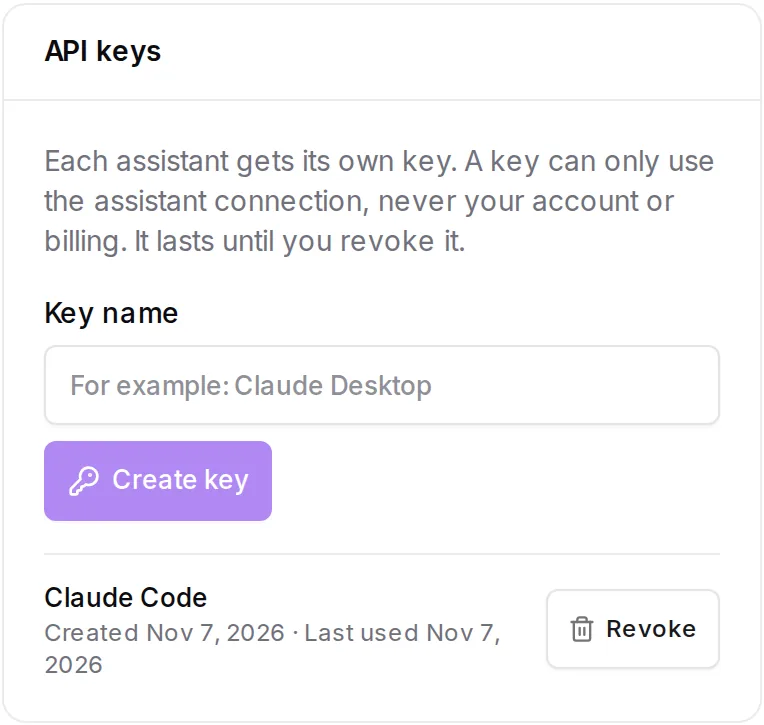
The API keys card in the app, on a sample account. -
Add the server
Run this in your terminal, with your key in place of
YOUR_API_KEY.claude mcp add --transport http theserpagent \ https://api.theserpagent.ai/api/mcp \ --header "Authorization: Bearer YOUR_API_KEY"
This adds it for the project you are in. To use it in all your projects, add
--scope user. -
Check the connection
claude mcp list

theserpagent: https://api.theserpagent.ai/api/mcp (HTTP) - ✔ Connected
-
Ask Claude
Start Claude Code and ask it to list your projects. It starts there on its own, because
list_projectsgives it the ids the other tools need.
If it does not connect
| What you see | What to do |
|---|---|
| ✘ Failed to connect: Server rejected the configured Authorization header (HTTP 401) | The key is wrong or revoked. Run claude mcp remove theserpagent, create a new key and repeat step 2. |
| A tool answers: Start your free trial to begin tracking. Choose a plan and add a card: nothing is charged for 14 days and you can cancel any time. | Tools that set up tracking, add a competitor or a channel, schedule a report, write a summary or spend checks need a plan or a running trial. Choose a plan in the app. |
| A tool answers that the plan's limit is reached | Your AI sees the same limits as you. Ask it to run get_usage, or change plan in the app. |
What a session looks like
alpinerun.example: which keywords dropped this week? For the biggest drop, show me what changed around it. Then make the client report for the last 30 days.
- list_projects
- get_changes
- get_overview
- get_report_branding
- generate_report
- explain_change
- get_keyword_history
- get_rankings
Four alpinerun.example keywords dropped this week, and "trail running shoes" is the one to look at first. […] New and gone: gearlab-reviews entered the top 10, and fleetfootmag fell out of it. […] Cause: this data shows what moved, not why, so it doesn't explain the drop.
Things to ask
- Which of my keywords dropped this week?
- What changed around "trail running shoes" since yesterday?
- Add these 20 keywords to my store project and put them in a list called Spring.
- Refresh my money keywords and tell me how many checks I have left.
- Tell me when any keyword in the money list drops 3 places or more.
- Make the client report for the last 30 days.
Claude can also reach competitors, AI Overview, Slack and webhook alerts, report branding and schedules, and summaries. Billing, login and API keys stay in the dashboard. What your AI reaches
Claude Desktop
Claude Desktop connects through the small mcp-remote helper, which needs Node.js. Open Settings, then Developer, then Edit config, add this with your key, and restart Claude Desktop.
{
    "mcpServers": {
        "theserpagent": {
            "command": "npx",
            "args": [
                "-y",
                "mcp-remote",
                "https://api.theserpagent.ai/api/mcp",
                "--header",
                "Authorization:${THESERPAGENT_KEY}"
            ],
            "env": {
                "THESERPAGENT_KEY": "Bearer YOUR_API_KEY"
            }
        }
    }
}
How these steps were checked
The command and claude mcp list were run with Claude Code 2.1.319 against a test copy of the server, with a sample account, and a session then called the tools shown above. The 401 message came from the live server with a wrong key. The mcp-remote helper connected the same way; the Claude Desktop app itself was not part of this check.